


Companies are entering a phase where AI is no longer only a productivity tool for individuals. The strategic question is becoming organizational: how can a company redesign its workflows, decisions, knowledge, tools, and operating model so that intelligent systems become part of how work actually gets done? This is the shift from using AI occasionally to becoming an agentic company.
An agentic company is not a company where everyone experiments with chatbots. It is a company that deliberately embeds AI agents into its processes: to analyze information, prepare decisions, coordinate work, generate outputs, monitor change, trigger actions, and reduce the burden of repetitive judgment-heavy work. The challenge is that most organizations do not yet have a clear design language for this transformation.
The Agentic Software Canvas is built for decision makers who want to make their company more agentic in a serious, practical, and governed way. It is not primarily a technical architecture diagram, and it is not a generic AI brainstorming exercise. It is a strategic design tool for identifying where agentic systems should exist, what work they should improve, how they should operate, and what boundaries must control them.
The canvas starts from the reality of work. It asks who the system is for, what mission it should accomplish, and what is broken in the current workflow. This matters because agentic transformation should not begin with the question “What AI feature can we build?” It should begin with the question “Which human capability, workflow, or decision process inside the company should become dramatically stronger?”
From there, the canvas connects business value with operational feasibility. It examines the environment in which the system must operate, the ROI it must create, the knowledge it must access, and the agentic roles it must contain. In this sense, the canvas helps leaders move beyond scattered AI experiments and toward repeatable systems that can create measurable value.
The canvas also treats autonomy as something that must be designed, not assumed. Agentic systems may suggest, recommend, prepare, execute, escalate, or monitor — but each level of autonomy requires boundaries. Decision makers need to define what the system can do, when it needs approval, what tools it may access, and how its actions will be observed.
This is especially important because agentic software increases both capability and risk. The same system that can save time, improve decisions, and coordinate work can also make mistakes, use poor data, overstep authority, or create accountability problems. That is why validation and risk are not secondary concerns; they are part of the core canvas.
The purpose of the Agentic Software Canvas is to give leaders a practical way to redesign company processes for the agentic era. It helps decision makers move from isolated AI use cases toward governed, ROI-driven, workflow-native intelligence systems. In other words, it is a canvas for companies that do not only want to use AI — they want to become agentic.
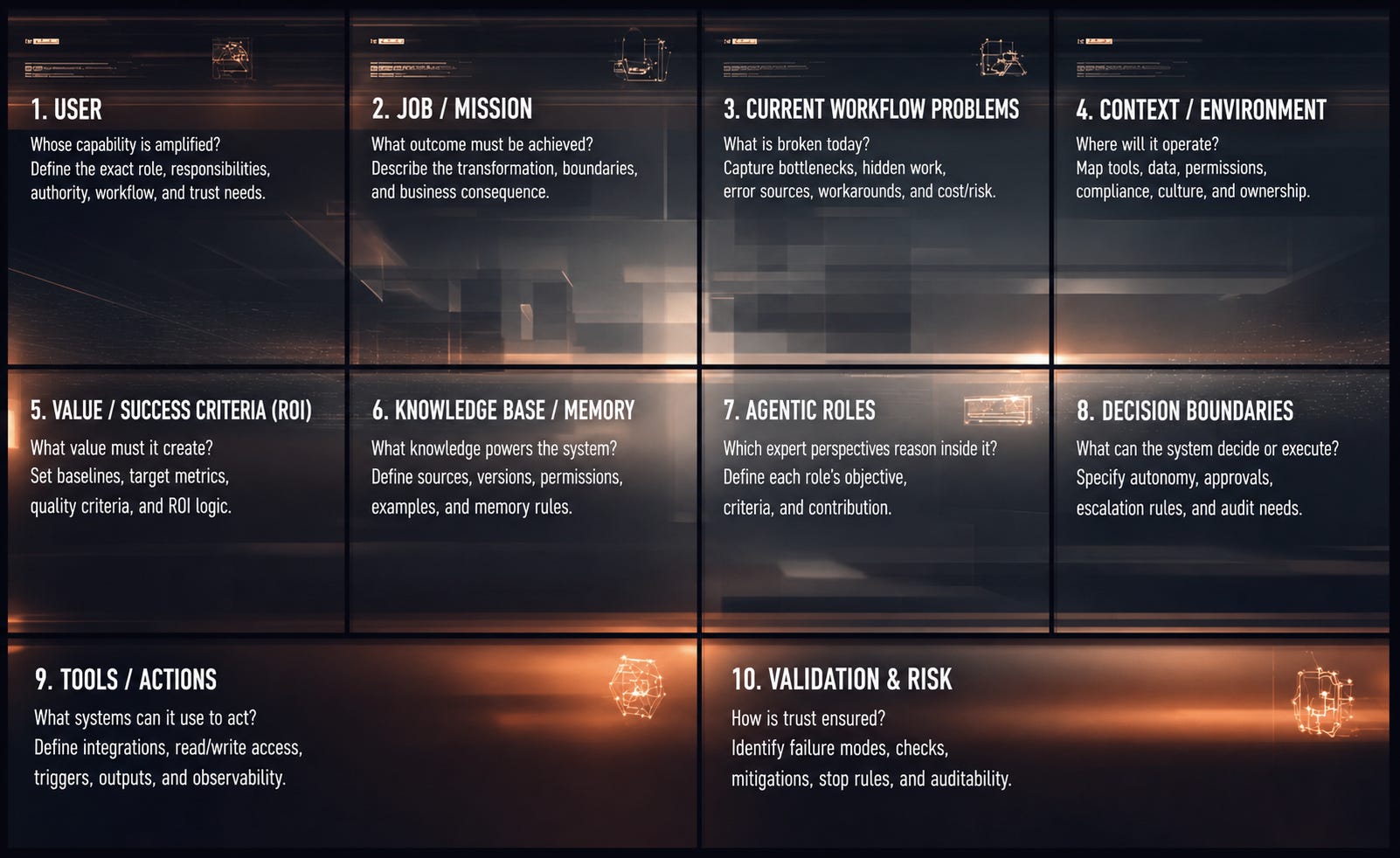
Summary
1. User
The User block defines whose capability the agentic system is designed to amplify.
It is not just the person using an interface, but the role whose judgment, coordination, attention, or execution capacity is being extended.
A strong User block captures responsibility, authority, workflow reality, expertise, and trust requirements.
It prevents the system from becoming generic and ensures it fits real work.
Key points:
Identify the specific role, not just the department.
Capture what the user is accountable for.
Understand their tools, routines, pressure, and constraints.
Clarify what they can decide, recommend, or approve.
Define what they need in order to trust the system.
2. Job / Mission
The Job / Mission block defines the meaningful outcome the system must help produce.
It is not a feature or task list, but the transformation the user is trying to achieve.
A strong mission describes the before-and-after state of the workflow.
It gives the system a clear purpose and prevents unfocused AI functionality.
Key points:
Define what progress the user is trying to make.
Describe the desired outcome, not just the activity.
Set clear start and end boundaries.
Identify whether the system assists, recommends, executes, or monitors.
Connect the mission to real business consequences.
3. Current Workflow Problems
This block defines what is broken, slow, risky, expensive, fragmented, or cognitively heavy in the current workflow.
It does not merely collect complaints; it identifies the mechanisms causing friction.
A strong problem block reveals bottlenecks, hidden work, workarounds, error sources, and scaling limits.
It explains why the workflow deserves to be redesigned through agentic software.
Key points:
Identify concrete pain points and bottlenecks.
Look for hidden work: searching, checking, rewriting, reminding, reconciling.
Notice workarounds such as spreadsheets, unofficial tools, or repeated meetings.
Estimate time, cost, risk, or opportunity loss.
Explain why existing tools do not solve the problem.
4. Context / Environment
The Context / Environment block defines the reality in which the agentic system must operate.
It includes organizational structure, existing tools, data quality, permissions, compliance, culture, and ownership.
This block prevents demo-level thinking by grounding the system in deployment conditions.
It determines what kind of agentic system is actually possible.
Key points:
Map the existing tools, systems, and workflows.
Assess data availability, quality, freshness, and access rights.
Identify legal, compliance, security, and organizational constraints.
Understand cultural readiness, trust, and adoption barriers.
Clarify who owns and maintains the system after deployment.
5. Value / Success Criteria (ROI)
This block defines what improvement the system must create and how success will be measured.
It connects the agentic system to business value, not just technical possibility.
Value can come from time savings, cost reduction, revenue growth, risk reduction, quality improvement, or capacity expansion.
A strong ROI block makes the system fundable, evaluable, and prioritizable.
Key points:
Define the primary value driver.
Establish the current baseline.
Set target improvement metrics.
Include both hard metrics and quality criteria.
Connect value directly to the mission and workflow problem.
6. Knowledge Base / Memory
The Knowledge Base / Memory block defines what persistent knowledge the system needs to operate intelligently.
It includes policies, documents, examples, customer history, domain rules, past decisions, and workflow memory.
This block makes the system company-specific rather than generic.
It also enables consistency, continuity, and compounding organizational intelligence.
Key points:
Identify mission-relevant knowledge sources.
Separate approved knowledge from drafts, informal notes, or outdated material.
Define ownership, update rules, permissions, and versioning.
Include examples of high-quality past work.
Decide what the system should remember, retrieve, cite, or forget.
7. Agentic Roles
The Agentic Roles block defines the expert perspectives the system uses to reason about the mission.
These roles are not decorative personas; they are structured reasoning functions.
Each role should have an objective, perspective, criteria, method, and output contribution.
This block turns a generic assistant into a multi-perspective intelligence system.
Key points:
Select roles that directly improve the mission.
Define what each role optimizes for.
Use roles such as analyst, strategist, critic, compliance reviewer, financial evaluator, or customer advocate.
Avoid unnecessary role proliferation.
Sequence roles so they act at the right moment.
8. Decision Boundaries
Decision Boundaries define what the system is allowed to decide, recommend, prepare, execute, or escalate.
This block makes autonomy governable instead of treating it as all-or-nothing.
It clarifies when the system should inform, suggest, recommend, prepare, execute with approval, execute under conditions, or stop.
It is essential for trust, control, accountability, and enterprise adoption.
Key points:
Define the system’s autonomy levels.
Identify which actions require approval.
Set escalation rules for uncertainty, risk, or missing data.
Align boundaries with user authority and organizational policy.
Log important decisions, approvals, and actions.
9. Tools / Actions
The Tools / Actions block defines what systems, APIs, workflows, and operational actions the agentic system can use.
It is the bridge between reasoning and real-world impact.
Tools may retrieve data, generate documents, update records, send notifications, create tasks, or trigger workflows.
This block ensures the system can actually complete the mission, not just advise about it.
Key points:
Identify required integrations and action surfaces.
Distinguish read access from write access.
Connect tools only when they support the mission.
Define permissions, triggers, output destinations, and fallback behavior.
Ensure tool actions are logged and observable.
10. Validation & Risk
Validation & Risk defines how the system’s outputs and actions are checked, what can go wrong, and how failures are mitigated.
It combines checks, controls, evaluation, failure modes, escalation, auditability, and risk management.
This block is the trust layer of the canvas.
It makes the system reliable enough for real workflows rather than impressive only in demonstrations.
Key points:
Identify concrete failure modes.
Classify risks by severity.
Define validation checks, evidence requirements, and stop rules.
Create mitigation strategies for major risks.
Ensure outputs, decisions, and tool actions are auditable and testable.
Canvas Elements
1. User
1. Definition
The User block defines the specific person, role, or organizational function whose capability is being amplified by the agentic system.
In ordinary software, the user is often treated as someone who interacts with an interface. In agentic software, the user is better understood as the human capability around which the system is designed. That capability may include judgment, coordination, communication, memory, prioritization, decision-making, interpretation, or follow-through.
The User block therefore asks:
Whose work capacity, judgment, or decision-making ability is this system meant to extend?
A good User block does not describe a vague group such as “sales,” “finance,” or “management.” It describes a real working role with enough specificity that the rest of the system can be designed around their actual responsibilities, tools, authority, and trust requirements.
2. Purpose
The purpose of the User block is to anchor the system in real operational work.
Organizations do not operate through abstract processes alone. They operate through people who interpret information, handle exceptions, coordinate with others, make trade-offs, and carry responsibility for outcomes.
This block prevents generic AI design. It clarifies who the system must actually serve, what kind of work they carry, what they are allowed to decide, and what they need in order to trust the system.
It also prevents adoption failure. A system may be technically strong but still unused if it does not fit the user’s habits, tools, pressure, or decision environment.
The deeper purpose is this:
Agentic software is not designed for an abstract organization. It is designed around specific human capabilities inside that organization.
3. What to Fill In
In this block, describe the primary user as an operational role, not as a broad audience.
Include:
Primary user role
Who is the specific user?
Example:
Sales manager responsible for prioritizing inbound leads, assigning opportunities, and preparing weekly pipeline reviews.
Responsibility
What is this person accountable for?
Examples:
reducing supplier risk
improving sales conversion
preparing accurate reports
resolving customer issues
coordinating delivery
maintaining compliance
Work context
How does the user actually work?
Include:
tools
systems
documents
meetings
handoffs
communication channels
approval chains
Decision scope
What can the user decide, approve, recommend, or escalate?
This later shapes the Decision Boundaries block.
Expertise level
How much domain knowledge, technical literacy, and AI literacy does the user have?
This affects how autonomous, guided, or explainable the system should be.
Trust requirements
What does the user need before acting on the system output?
Examples:
sources
audit trail
confidence score
editable draft
risk warning
explanation of assumptions
Pressure and pain
What kind of pressure does the user work under?
Examples:
high volume
time pressure
coordination overload
decision fatigue
customer pressure
risk exposure
Stakeholder ecosystem
Who else is affected?
Examples:
manager
customer
IT
legal
compliance
finance
external partners
executives
4. Diagnostic Questions
Who is the primary user of the system?
What exact role do they perform?
What are they responsible for delivering?
Who depends on their work?
What tools and information sources do they use?
What decisions do they make regularly?
What decisions are outside their authority?
What makes their work difficult today?
How much expertise do they have?
Can they evaluate whether the system output is correct?
What would make them trust the system?
What would make them ignore it?
Who approves, reviews, or governs their work?
What would make this system fit naturally into their day?
5. Patterns & Archetypes
Operator
Performs recurring structured work. Needs speed, clarity, and fewer mistakes.
Analyst
Turns information into insight. Needs synthesis, comparison, and evidence.
Decision-Maker
Chooses between options. Needs trade-offs, scenarios, and recommendations.
Coordinator
Moves work across people and systems. Needs visibility, follow-up, and escalation.
Expert
Applies specialized judgment. Needs precision, validation, and control.
Communicator
Turns knowledge into messages. Needs personalization, tone, and audience adaptation.
Executive
Consumes compressed intelligence. Needs clarity, prioritization, and decision-ready summaries.
Internal Champion
Spreads the system inside the organization. Needs proof, templates, and adoption material.
These archetypes help clarify what kind of capability the system should amplify.
6. Common Mistakes
Defining the user too broadly
“Finance department” is not enough. The canvas needs the actual role and responsibility.
Confusing user, buyer, approver, and beneficiary
In enterprise systems, these are often different people.
Ignoring authority
The system should not produce actions the user cannot approve or execute.
Designing for an idealized user
Real users are busy, constrained, distracted, and embedded in messy workflows.
Ignoring trust requirements
Some users need citations, audit trails, confidence scores, or approval steps before acting.
Assuming adoption will happen automatically
Usefulness is not enough. The system must fit existing behavior and reduce friction.
7. Interactions with Other Blocks
User → Job / Mission
The user defines what the mission means in practice.
User → Current Workflow Problems
Different users experience the same workflow problem differently.
User → Value / Success Criteria
The value depends partly on the importance, scarcity, and cost of the user’s time and judgment.
User → Knowledge Base / Memory
The user’s work determines what knowledge the system needs.
User → Agentic Roles
The agentic roles should represent perspectives that help the user perform better.
User → Decision Boundaries
The user’s authority defines what the system may recommend, prepare, or execute.
User → Tools / Actions
The user’s existing tool environment shapes where the system must operate.
User → Validation & Risk
The user’s accountability determines how much validation is necessary.
8. Evaluation Criteria
A strong User block is:
Specific — it identifies a real role, not a department.
Operational — it describes how work is actually performed.
Decision-aware — it captures authority and responsibility.
Trust-aware — it explains what the user needs before acting.
Contextual — it includes tools, dependencies, and constraints.
Value-linked — it is clear why improving this user’s capability matters.
2. Job / Mission
1. Definition
The Job / Mission block defines the meaningful outcome the agentic system is expected to help produce.
It is not a task list. A task describes an activity. A mission describes the transformation that must happen in the user’s work.
For example:
“Summarize customer feedback”
is a task.
But:
“Convert scattered customer feedback into prioritized product insights that help the product team decide what to fix, build, or investigate next”
is a mission.
The Job / Mission block asks:
What progress is the user trying to make, and what result should the agentic system help create?
A strong mission has a before-and-after structure.
Before:
scattered information
unclear priorities
slow interpretation
inconsistent outputs
After:
structured understanding
clear recommendation
decision-ready artifact
next action prepared
2. Purpose
The purpose of this block is to prevent the system from becoming feature-driven.
Without a clear mission, teams tend to describe capabilities:
chatbot
report generator
email drafter
document analyzer
CRM assistant
dashboard
These may be useful forms, but they are not the reason the system should exist.
The mission explains what must become better in the organization. It defines the outcome that justifies the system.
It also protects against two failure modes:
Too narrow — the system automates a tiny task without meaningful value.
Too broad — the system attempts to solve an entire domain without clear boundaries.
The Job / Mission block gives the system a center of gravity.
3. What to Fill In
Describe the mission as a concrete business outcome.
Include:
Core job
What must the user accomplish?
Examples:
qualify leads
prepare decision memos
monitor risks
compare suppliers
analyze documents
draft proposals
resolve tickets
coordinate follow-up
Desired outcome
What should be true when the job is done?
Examples:
decision is ready
report is approved
customer is answered
risk is escalated
proposal is drafted
task list is created
Before-and-after state
Describe what changes.
Before:
Information is scattered across CRM notes, emails, and spreadsheets.
After:
Leads are ranked, enriched, assigned, and prepared for follow-up.
Start and end boundary
Where does the mission begin and end?
Example:
Starts when a new supplier proposal arrives. Ends when a ranked recommendation is prepared for approval.
Frequency
How often does this job occur?
Daily, weekly, monthly, quarterly, ad hoc, or event-triggered.
Frequency matters because recurring jobs often create stronger ROI.
Stakes
What happens if the job is done badly?
Examples:
lost revenue
compliance risk
poor customer experience
operational delay
wrong decision
wasted expert time
Level of agency
What role should the system play?
assist
draft
recommend
prioritize
coordinate
execute under conditions
monitor continuously
4. Diagnostic Questions
What is the real mission of this system?
What progress is the user trying to make?
What should be different after the system has done its work?
Where does the job begin?
Where does it end?
How often does the job happen?
What makes the job difficult?
What decisions are involved?
What information is required?
What artifact or action completes the job?
What happens if the job is done poorly?
Is this job repetitive, variable, or exception-heavy?
Does the system assist, recommend, execute, or monitor?
Why is agentic software better suited than ordinary automation?
5. Patterns & Archetypes
Analysis Mission
Turns documents, data, or signals into insight.
Example:
Analyze customer complaints and identify recurring product issues.
Generation Mission
Produces structured content or artifacts.
Example:
Generate a client-specific proposal based on CRM history and product documentation.
Decision-Support Mission
Helps compare options and recommend action.
Example:
Rank suppliers by cost, risk, reliability, and contractual fit.
Monitoring Mission
Continuously watches for changes or risks.
Example:
Detect when important customer accounts show signs of churn.
Coordination Mission
Moves work across people and systems.
Example:
Track project blockers and generate follow-up actions.
Execution Mission
Takes action through tools.
Example:
Create tickets, update CRM records, and send approved follow-up emails.
Governance Mission
Checks whether work complies with rules or standards.
Example:
Review outgoing documents against legal and brand requirements.
6. Common Mistakes
Describing the feature instead of the mission
“Chatbot for HR” is not a mission. “Help recruiters screen candidates consistently and prepare interview summaries” is closer.
Making the mission too broad
“Automate sales” is too large. “Prioritize inbound leads every morning” is usable.
Making the mission too small
A single micro-task may not justify an agentic system unless it is frequent or high-value.
Ignoring the end state
If you do not know what completion looks like, the system cannot be evaluated.
Ignoring stakes
Low-risk jobs and high-risk jobs require different validation and decision boundaries.
Confusing user activity with business value
The system should not merely help the user do more things. It should help produce a better outcome.
7. Interactions with Other Blocks
Job → User
The mission must match the user’s actual responsibility.
Job → Current Workflow Problems
The problems explain why this mission is worth redesigning.
Job → Value / Success Criteria
The mission defines what should be measured.
Job → Knowledge Base / Memory
The mission determines what knowledge the system needs.
Job → Agentic Roles
Different missions require different expert perspectives.
Job → Decision Boundaries
The mission determines how much autonomy is appropriate.
Job → Tools / Actions
The mission determines which systems the agent must interact with.
Job → Validation & Risk
The mission determines what failure means and how serious it is.
8. Evaluation Criteria
A strong Job / Mission block is:
Outcome-oriented — it describes what must be achieved, not just what is done.
Bounded — it has a clear start and end.
Relevant — it connects to real business value.
Operational — it can be translated into workflow behavior.
Measurable — success can be evaluated.
Agentically suitable — it benefits from context, reasoning, judgment, or tool use.
3. Current Workflow Problems
1. Definition
The Current Workflow Problems block defines what is structurally wrong, inefficient, risky, slow, fragmented, or cognitively expensive in the existing way of working.
This block does not simply capture complaints. It identifies the mechanisms that make the current workflow inadequate.
A weak problem description says:
The process is slow.
A stronger one says:
The process is slow because relevant information is spread across email, CRM notes, spreadsheets, and meeting summaries, so the user must manually reconstruct context before making each decision.
The goal is to describe the problem in a way that reveals what the agentic system must improve.
This block asks:
What exactly makes the current workflow painful, expensive, unreliable, or hard to scale?
2. Purpose
The purpose of this block is to create a real reason for the system to exist.
Agentic software should not begin with fascination about agents. It should begin with a workflow that deserves to be redesigned.
The Current Workflow Problems block prevents premature solution design. It forces the team to understand the current state before inventing the future state.
It also reveals where agentic software is genuinely useful. The best opportunities often appear where work is:
repetitive but not simple
judgment-heavy but evidence-based
fragmented across systems
dependent on tacit expertise
slowed by coordination
vulnerable to inconsistency
difficult to scale manually
This block is especially important because the current workflow often contains the hidden specification for the future system. Every workaround, delay, spreadsheet, manual check, repeated message, and approval bottleneck shows what the system may need to support.
3. What to Fill In
Describe the problems in the current workflow as concrete mechanisms.
Include:
Main pain points
What is visibly difficult today?
Examples:
slow analysis
repetitive manual work
inconsistent output quality
scattered information
delayed follow-up
unclear priorities
excessive meetings
Bottlenecks
Where does work get stuck?
Examples:
waiting for approval
searching for data
comparing documents
preparing summaries
checking compliance
coordinating teams
resolving exceptions
Fragmentation
Where is information or responsibility split?
Examples:
CRM + email + spreadsheet
Slack + documents + meetings
multiple owners
unclear handoffs
disconnected systems
Error sources
Where do mistakes happen?
Examples:
outdated data
missing context
manual copy-paste
inconsistent judgment
unclear rules
rushed review
poor documentation
Hidden work
What work is necessary but invisible?
Examples:
checking
reformatting
reminding
reconciling
searching
rewriting
validating
escalating
Cost of the problem
What does the current workflow cost?
Examples:
hours lost
delayed revenue
missed opportunities
rework
customer dissatisfaction
risk exposure
expert time wasted
Existing workaround
How do people compensate today?
Examples:
personal spreadsheets
unofficial ChatGPT use
manual templates
Slack reminders
junior employee support
duplicate trackers
repeated meetings
Workarounds are extremely valuable evidence because they show where the official process does not meet reality.
4. Diagnostic Questions
What part of the current workflow is most painful?
Where does work slow down?
Where do people repeatedly search for context?
Which steps require unnecessary manual effort?
Which steps require judgment?
Where do mistakes most often happen?
Where is information fragmented?
Where is responsibility unclear?
Which workarounds have people created?
What gets copied, pasted, checked, reformatted, or rewritten?
What causes delays?
What causes rework?
What is difficult to scale?
What depends too much on one person?
What is currently invisible but necessary?
What does this problem cost in time, money, risk, or opportunity?
Why do existing tools not solve it?
5. Patterns & Archetypes
Fragmented Context Problem
Information exists, but it is scattered across tools, documents, and conversations.
Manual Reconstruction Problem
The user must repeatedly rebuild context before doing useful work.
Inconsistent Judgment Problem
Different people interpret the same situation differently.
Coordination Bottleneck
Work slows because people wait for updates, approvals, or handoffs.
Expert Bottleneck
A senior person must repeatedly review, interpret, or decide.
Hidden Administration Problem
A large amount of value-draining work happens around the main task.
Follow-Up Failure
Good decisions or conversations do not reliably turn into action.
Scale Breakdown
The workflow works at low volume but collapses when demand increases.
Quality Drift
Outputs vary depending on who performs the work, how busy they are, or what context they remember.
Tool-Process Gap
Existing tools store information but do not actively help interpret, prioritize, decide, or execute.
6. Common Mistakes
Describing symptoms instead of causes
“The process is inefficient” is not enough. Explain why.
Treating all manual work as bad
Some manual judgment is valuable. The goal is not to remove humans blindly, but to remove unnecessary burden.
Ignoring workarounds
Workarounds reveal where the system is already failing.
Underestimating coordination costs
A lot of organizational waste happens between tasks, not inside tasks.
Ignoring hidden work
Searching, checking, rewriting, formatting, and reminding are often major sources of wasted time.
Assuming existing tools solve the problem
A CRM may store customer data but still not help prioritize accounts. A dashboard may show metrics but still not recommend action.
Failing to quantify the pain
Without even rough estimates, the problem may remain too abstract to justify investment.
7. Interactions with Other Blocks
Problems → User
Problems must be described from the user’s real working experience.
Problems → Job / Mission
The mission should directly respond to the workflow problems.
Problems → Value / Success Criteria
The problems define what improvement should be measured.
Problems → Knowledge Base / Memory
Fragmented context reveals what knowledge must be connected or remembered.
Problems → Agentic Roles
The type of problem suggests which expert perspectives are needed.
Problems → Decision Boundaries
Risky or ambiguous problems require stricter boundaries.
Problems → Tools / Actions
Bottlenecks reveal where tools or integrations may be necessary.
Problems → Validation & Risk
Error sources become the basis for validation design.
8. Evaluation Criteria
A strong Current Workflow Problems block is:
Mechanistic — it explains why the problem happens.
Specific — it identifies concrete friction points.
Evidence-based — it reflects real workflow behavior, not vague impressions.
Cost-aware — it estimates time, money, risk, or opportunity cost.
Design-relevant — it reveals what the future system must improve.
Prioritized — it distinguishes major problems from minor annoyances.
Connected to workarounds — it notices how people already compensate.
Scalable — it shows whether the problem becomes worse with volume or complexity.
4. Context / Environment
1. Definition
The Context / Environment block defines the organizational, technical, operational, legal, cultural, and data environment in which the agentic system must operate.
This block answers:
What reality must the system fit into?
Agentic software does not exist in a vacuum. It works inside existing processes, systems, permissions, habits, incentives, regulations, and organizational politics. A system that looks brilliant in a demo may fail completely when placed inside a real company environment with messy data, strict access rules, unclear ownership, fragmented tools, and skeptical users.
Context includes both the visible environment and the hidden constraints.
Visible context:
tools
databases
documents
workflows
users
teams
approval processes
Hidden context:
informal workarounds
political sensitivities
compliance pressure
trust issues
legacy systems
data quality problems
resistance to change
unclear ownership
The Context / Environment block is where the canvas becomes enterprise-realistic.
2. Purpose
The purpose of this block is to prevent “toy agent” thinking.
A toy agent works in an isolated, clean, controlled scenario. A real enterprise agent must operate inside a living organization. It must respect permissions, retrieve the right data, fit into existing tools, produce outputs in useful formats, and avoid violating process, legal, or cultural constraints.
This block helps answer:
Can this system actually be deployed?
Where will it live?
What systems must it connect to?
What constraints must it respect?
What organizational realities may block adoption?
What data is available, missing, messy, or restricted?
The deeper insight is that context is not just background information. Context actively shapes what kind of agentic system is possible.
The same mission may require very different system designs depending on whether it operates in:
a startup
a bank
a hospital
a public institution
a manufacturing company
a consulting firm
a regulated international organization
Context determines the level of autonomy, validation, integration, security, explainability, and governance required.
Without this block, teams risk designing systems that are conceptually attractive but operationally impossible.
3. What to Fill In
In this block, describe the real environment around the workflow.
Include the following areas.
A. Organizational setting
Where in the company does the system operate?
Examples:
sales department
procurement team
legal department
customer support
finance operations
executive office
product team
compliance unit
HR recruitment
internal knowledge management
Also include the organizational level:
individual workflow
team workflow
cross-functional process
department-wide system
enterprise-wide capability
This matters because the broader the environment, the more coordination, governance, and change management is required.
B. Existing tools and systems
What tools already shape the work?
Examples:
CRM
ERP
email
Slack / Teams
SharePoint / Google Drive
Notion / Confluence
Jira / Asana
BI dashboards
internal databases
document management systems
ticketing systems
HR systems
finance software
Agentic software should not ignore the existing tool stack. It should either integrate into it, orchestrate across it, or deliberately replace part of it.
C. Data environment
What data exists, where does it live, and how usable is it?
Consider:
structured data
unstructured documents
emails
transcripts
spreadsheets
CRM notes
historical decisions
policies
customer records
product documentation
reports
contracts
tickets
Also assess:
data quality
completeness
freshness
access rights
consistency
ownership
sensitivity
fragmentation
Many agentic systems fail not because the model is weak, but because the data environment is not ready.
D. Process environment
How does the workflow currently move?
Include:
start trigger
handoffs
approval steps
review stages
deadlines
escalation points
dependencies
outputs
exceptions
recurring cycles
This is important because the system must enter the workflow at the right point. A system that produces a good output at the wrong moment is still badly designed.
E. Constraints
What limits the system?
Examples:
legal requirements
compliance rules
data privacy
cybersecurity policies
procurement limitations
internal approval processes
budget constraints
integration limits
union / labor concerns
regulatory sensitivity
audit requirements
brand constraints
Constraints are not just obstacles. They are design parameters.
F. Cultural and adoption environment
What is the organization’s attitude toward AI, automation, and process change?
Consider:
enthusiasm
skepticism
fear of job replacement
tool fatigue
previous failed initiatives
strong internal champions
weak leadership buy-in
low trust in data
preference for manual control
openness to experimentation
This matters because the system must be adopted socially, not only installed technically.
G. Ownership and maintenance
Who owns the system after deployment?
Examples:
business team
IT
innovation team
external vendor
operations lead
data team
AI transformation office
compliance owner
Agentic systems require maintenance. Prompts, knowledge, integrations, evaluations, and permissions may all need updates. If no one owns the system, it degrades.
4. Diagnostic Questions
Where exactly will the system operate?
Is this an individual, team, department, or enterprise workflow?
What tools does the workflow currently depend on?
Where does relevant data live?
Is the data structured, unstructured, or mixed?
Is the data complete, reliable, and fresh enough?
Who owns the data?
Who is allowed to access it?
What permissions are needed?
What approval steps exist today?
What compliance or legal constraints apply?
What security risks must be considered?
What existing habits must the system fit into?
What previous automation or AI attempts happened here?
Who might support the system?
Who might resist it?
Who will maintain it after launch?
What would make this system impossible to deploy in practice?
5. Patterns & Archetypes
Clean Digital Environment
The workflow already lives mostly in structured systems.
Examples:
CRM-based sales process
ticketing workflow
ERP procurement process
Opportunity:
Easier integration, clearer data access, stronger automation potential.
Risk:
Existing systems may be rigid or politically protected.
Fragmented Knowledge Environment
Important information is spread across documents, chats, emails, spreadsheets, and people.
Opportunity:
Strong use case for retrieval, synthesis, and knowledge orchestration.
Risk:
Poor data hygiene and unclear ownership can undermine reliability.
Regulated Environment
The workflow is constrained by compliance, auditability, legal rules, or privacy.
Examples:
finance
healthcare
public sector
insurance
legal
HR
Opportunity:
High value if reliability and traceability are solved.
Risk:
Requires stronger validation, decision boundaries, and governance.
Informal Workflow Environment
The work depends heavily on tacit knowledge and informal coordination.
Examples:
“Ask Jana, she knows”
private spreadsheets
Slack-based approvals
undocumented exceptions
Opportunity:
Agentic software can make hidden work visible and repeatable.
Risk:
Hard to formalize because much of the real process is not documented.
Tool-Saturated Environment
The organization already uses many tools, but they do not work together well.
Opportunity:
Agentic orchestration can connect fragmented systems.
Risk:
Another tool may increase complexity if poorly integrated.
Low-Trust Environment
Users are skeptical of AI, data, or automation.
Opportunity:
A well-designed system can build trust through transparent outputs.
Risk:
Adoption will fail if the system feels like a black box.
6. Common Mistakes
Treating context as background
Context is not decoration. It determines what can be built, deployed, trusted, and maintained.
Designing outside the tool reality
If users live in Teams, Outlook, SharePoint, Salesforce, or Excel, the system must respect that. A separate interface may fail even if the logic is good.
Ignoring data quality
Agentic systems do not magically fix bad data. They may amplify its problems unless data quality is understood.
Ignoring permissions
Access control is not an implementation detail. It shapes what the system can know and do.
Underestimating compliance
In regulated environments, validation, logging, and auditability may be central, not optional.
Forgetting ownership
A system without an owner becomes outdated. Knowledge changes, workflows change, policies change, and tools change.
Mistaking a demo for deployment
A demo proves possibility. Context determines whether the system can actually work in production.
7. Interactions with Other Blocks
Context → User
The user’s behavior is shaped by the tools, rules, and habits of the environment.
Context → Job / Mission
The same mission may require different designs in different environments.
Context → Current Workflow Problems
Many problems arise directly from context: fragmented tools, poor data, unclear ownership, or compliance constraints.
Context → Value / Success Criteria
ROI depends on what is realistically changeable in the environment.
Context → Knowledge Base / Memory
Context determines where knowledge comes from and how it must be governed.
Context → Agentic Roles
Regulated or complex environments may require roles such as compliance reviewer, risk analyst, legal checker, or domain expert.
Context → Decision Boundaries
The environment determines what the system is allowed to decide or execute.
Context → Tools / Actions
The tool stack defines the realistic action surface of the agentic system.
Context → Validation & Risk
Security, compliance, data sensitivity, and process complexity shape the risk layer.
8. Evaluation Criteria
A strong Context / Environment block is:
Operationally grounded — it describes the actual working environment, not an idealized one.
Technically aware — it identifies tools, systems, data sources, and integration needs.
Constraint-aware — it includes legal, security, compliance, and organizational limits.
Adoption-aware — it recognizes culture, trust, habits, and resistance.
Ownership-aware — it clarifies who maintains and governs the system.
Deployment-relevant — it reveals what must be true for the system to work in practice.
5. Value / Success Criteria (ROI)
1. Definition
The Value / Success Criteria (ROI) block defines what improvement the agentic system must create and how that improvement will be recognized, measured, or justified.
This block answers:
What must become better, and how will we know the system is worth building?
In agentic software, value is not limited to direct cost savings. The system may create value by saving time, increasing revenue, reducing risk, improving decision quality, speeding up cycle time, reducing expert bottlenecks, improving consistency, or enabling work that was previously impossible.
ROI should therefore be understood broadly.
It includes:
financial value
time value
quality value
risk value
strategic value
capability value
adoption value
A good Value / Success Criteria block does not merely say “improve efficiency.” It defines what kind of improvement matters, where it appears, and what evidence would prove that the system works.
2. Purpose
The purpose of this block is to keep agentic software connected to business reality.
AI systems often generate excitement before they generate value. The Value / Success Criteria block forces the team to define the value hypothesis before investing too much into architecture, tooling, or implementation.
It prevents “AI theater” — systems that look innovative but do not meaningfully improve the organization.
This block also creates the basis for prioritization. If several agentic systems are possible, the organization needs to know which one matters most. The strongest candidates usually combine:
high frequency
high pain
measurable cost
clear business consequence
available data
realistic implementation
manageable risk
The Value / Success Criteria block also shapes validation. If the system claims to save time, time must be measured. If it claims to improve quality, quality must be evaluated. If it claims to reduce risk, risk indicators must be defined.
Without this block, the system may be interesting but not fundable.
3. What to Fill In
In this block, define the value of the system in practical terms.
Include the following areas.
A. Primary value driver
What is the main type of value?
Examples:
time saved
cost reduced
revenue increased
risk reduced
quality improved
decision speed increased
decision quality improved
expert capacity expanded
customer experience improved
compliance strengthened
Choose the primary value driver. Do not list everything equally.
A system with one clear value driver is easier to explain, fund, and evaluate.
B. Success criteria
What would count as success?
Examples:
reduce report preparation time by 50%
respond to customer tickets 30% faster
identify high-risk contracts before legal review
reduce proposal drafting time from 6 hours to 90 minutes
increase lead follow-up speed within 24 hours
reduce manual data reconciliation
improve consistency of review outputs
Success criteria should be concrete enough to guide design.
C. Baseline
What is the current state?
Examples:
hours spent per week
current error rate
current cycle time
current cost
current number of delayed cases
current conversion rate
current backlog
current customer response time
Without a baseline, improvement is hard to prove.
D. Target improvement
What improvement is expected?
Examples:
20% time reduction
50% faster review
30% fewer errors
10% higher conversion
80% reduction in manual formatting
2 days shorter cycle time
5 senior expert hours saved per week
The target does not need to be perfect at the beginning. It can be a hypothesis. But it must be explicit.
E. Economic estimate
Translate the improvement into business value where possible.
Examples:
hours saved × hourly cost
faster sales follow-up × conversion improvement
reduced rework × labor cost
fewer errors × avoided penalties
faster reporting × earlier decisions
reduced expert dependency × capacity expansion
Even rough estimates are useful. They force prioritization.
F. Quality criteria
Not all value is financial.
Include quality criteria such as:
accuracy
completeness
consistency
clarity
usefulness
actionability
traceability
compliance
stakeholder satisfaction
For agentic systems, quality often matters as much as speed.
G. Strategic value
Some systems create value by building a new organizational capability.
Examples:
reusable knowledge base
scalable decision support
improved organizational memory
faster onboarding
better internal coordination
foundation for future agentic workflows
reduced dependence on individual experts
This matters because the first agentic system may be valuable not only for its immediate workflow, but also as infrastructure for future systems.
4. Diagnostic Questions
What is the primary value this system should create?
Is the value mainly time, cost, revenue, risk, quality, or capability?
What is the current baseline?
How much time does the workflow currently take?
How often does the workflow occur?
What does the current problem cost?
What improvement would be meaningful?
What improvement would be impressive?
What improvement would justify investment?
What metric would leadership care about?
What metric would the user care about?
What metric would compliance, IT, or operations care about?
What would prove the system is working?
What would show that it is not worth continuing?
Is the value measurable directly or indirectly?
What soft benefits matter?
What strategic capability might this create beyond the first use case?
5. Patterns & Archetypes
Time-Saving Value
The system reduces manual work, preparation time, or review time.
Best for:
reporting
document analysis
drafting
reconciliation
customer support
research workflows
Risk:
Time saved is often overestimated unless the workflow is measured honestly.
Quality-Improvement Value
The system makes outputs more consistent, complete, accurate, or structured.
Best for:
compliance reviews
proposal creation
customer communication
policy analysis
legal drafting
research synthesis
Risk:
Quality needs evaluation criteria; otherwise it becomes subjective.
Revenue Value
The system increases sales, conversion, retention, upsell, or response speed.
Best for:
lead prioritization
sales personalization
churn detection
account intelligence
campaign generation
Risk:
Revenue impact may be harder to isolate from other factors.
Risk-Reduction Value
The system reduces mistakes, missed obligations, compliance gaps, or bad decisions.
Best for:
contracts
legal review
HR decisions
financial reporting
regulated workflows
cybersecurity operations
Risk:
Avoided risk is valuable but sometimes difficult to quantify.
Capacity-Expansion Value
The system allows the same team to handle more work without proportional hiring.
Best for:
expert-heavy workflows
customer support
analysis teams
consulting
operations
internal service departments
Risk:
Capacity gains must not come at the expense of trust or quality.
Strategic Capability Value
The system becomes infrastructure for future transformation.
Best for:
knowledge management
internal AI platforms
decision intelligence
reusable agentic workflows
cross-department automation
Risk:
Strategic value can become vague unless tied to concrete near-term use cases.
6. Common Mistakes
Saying “efficiency” without defining it
Efficiency must become measurable. Faster what? Cheaper what? Fewer errors where?
Treating ROI only as cost savings
Agentic systems may create more value through decision quality, risk reduction, speed, or capacity expansion than through direct headcount savings.
Ignoring baseline
Without a current baseline, improvement becomes storytelling.
Measuring what is easy instead of what matters
Counting generated outputs is not the same as measuring useful business impact.
Overpromising value
Credibility matters. It is better to state a realistic value hypothesis than a dramatic but unsupported claim.
Ignoring quality
A system that is faster but less reliable may destroy value.
Ignoring adoption
ROI only appears if the system is actually used.
Treating all benefits equally
One primary value driver should dominate. Secondary benefits can support it.
7. Interactions with Other Blocks
Value → User
The value depends on whose time, judgment, or output is being amplified.
Value → Job / Mission
The mission defines what improvement should be measured.
Value → Current Workflow Problems
The problem explains why the value exists.
Value → Context / Environment
The environment determines whether value can realistically be captured.
Value → Knowledge Base / Memory
Better knowledge can create value through consistency, speed, and reuse.
Value → Agentic Roles
Roles should be chosen based on the kind of value needed: quality, risk, strategy, conversion, compliance, or execution.
Value → Decision Boundaries
Higher-value automation may justify more autonomy, but only when risk is controlled.
Value → Tools / Actions
Tools are justified only if they help create measurable value.
Value → Validation & Risk
Validation must protect the value claim. A system promising accuracy needs accuracy checks. A system promising compliance needs compliance validation.
8. Evaluation Criteria
A strong Value / Success Criteria block is:
Specific — it names the primary value driver.
Measurable — it includes metrics, even if approximate.
Baseline-aware — it describes the current state.
Outcome-linked — it connects directly to the mission.
Economically credible — it can justify investment.
Quality-aware — it does not sacrifice reliability for speed.
Prioritized — it separates primary and secondary value.
Adoption-aware — it recognizes that value appears only through use.
6. Knowledge Base / Memory
1. Definition
The Knowledge Base / Memory block defines what persistent knowledge the agentic system needs in order to operate intelligently, consistently, and contextually.
This block answers:
What must the system know beyond the immediate user request?
A generic language model can produce generic answers. An agentic system becomes useful inside a company when it can reason with company-specific knowledge, domain rules, past decisions, customer context, examples, policies, templates, and operational memory.
Knowledge Base / Memory includes both static and dynamic knowledge.
Static knowledge:
policies
product documentation
process manuals
brand guidelines
legal rules
templates
approved examples
domain knowledge
Dynamic memory:
past outputs
user preferences
feedback
decisions made
previous cases
customer interactions
workflow history
lessons learned
This block is where the system becomes less like a chatbot and more like an organizational intelligence layer.
2. Purpose
The purpose of this block is to make the agentic system company-specific and capable of compounding.
Without persistent knowledge, the system starts from zero every time. It may produce fluent outputs, but they will lack organizational context. It may answer questions, but it will not understand company policy, previous decisions, customer history, preferred formats, or domain-specific standards.
The Knowledge Base / Memory block solves several problems.
First, it improves relevance. The system can use the actual context of the company, not generic internet-like knowledge.
Second, it improves consistency. The system can produce outputs aligned with internal standards, terminology, methods, and previous decisions.
Third, it improves speed. Users do not need to repeatedly provide the same context.
Fourth, it enables learning. If the system remembers what worked, what was approved, what was corrected, and what patterns repeat, it can improve over time.
But memory must be designed carefully. More knowledge is not automatically better. A messy knowledge base can make the system worse by introducing outdated, contradictory, low-quality, or unauthorized information.
The purpose of this block is therefore not to collect everything. It is to define the knowledge that is necessary, trusted, maintained, and usable.
3. What to Fill In
In this block, describe the knowledge the system needs and how that knowledge should be managed.
Include the following areas.
A. Core knowledge sources
What documents, systems, or repositories should the system use?
Examples:
company policies
product documentation
sales materials
CRM records
customer notes
contract templates
knowledge articles
previous reports
meeting transcripts
strategy documents
SOPs
legal guidelines
brand manuals
training materials
The key question is not “What knowledge exists?” but:
What knowledge is required to complete the mission well?
B. Domain rules
What rules, principles, or constraints must the system know?
Examples:
compliance requirements
approval rules
pricing logic
brand voice
escalation rules
risk categories
customer segmentation
legal constraints
quality standards
decision criteria
These rules help the system behave consistently.
C. Examples and precedents
What past outputs should guide future outputs?
Examples:
approved proposals
successful campaigns
previous legal reviews
strong customer responses
high-quality reports
accepted decision memos
resolved support tickets
winning sales emails
past supplier evaluations
Examples are powerful because they show the system what “good” looks like in practice.
D. User-specific memory
What should the system remember about the user?
Examples:
preferred output format
recurring tasks
tone preferences
frequent customers
common decisions
preferred level of detail
approval habits
recurring corrections
This should be handled carefully, especially in enterprise contexts. Memory must support usefulness without becoming uncontrolled or invasive.
E. Workflow memory
What should the system remember about the process?
Examples:
previous cases
unresolved items
open risks
pending approvals
repeated blockers
follow-up history
decisions already made
status changes
recurring exceptions
Workflow memory helps the system move from isolated answers to continuity.
F. Knowledge governance
Who maintains the knowledge?
Consider:
owner
update frequency
approval process
version control
access permissions
expiration rules
source reliability
conflict resolution
audit requirements
This is critical. A knowledge base without governance becomes a risk.
G. Retrieval and usage logic
How should the system use knowledge?
Examples:
retrieve only relevant sources
prioritize approved documents
cite sources
ignore outdated files
separate facts from assumptions
ask when knowledge is missing
flag conflicting information
restrict sensitive data access
The question is not only what the system knows, but how it decides which knowledge to use.
4. Diagnostic Questions
What knowledge does the system need to complete the mission?
Where does that knowledge currently live?
Is the knowledge structured or unstructured?
Is it complete, current, and reliable?
Who owns it?
Who is allowed to access it?
What sources should be trusted most?
What sources should be excluded?
Are there conflicting documents or rules?
How often does the knowledge change?
What examples show high-quality work?
What previous decisions should the system remember?
What user preferences should be remembered?
What workflow state should persist over time?
What should the system forget or not store?
How should sensitive information be protected?
How should the system cite or explain its sources?
Who is responsible for keeping the knowledge base healthy?
5. Patterns & Archetypes
Policy Knowledge
Rules, standards, and approved procedures.
Examples:
HR policy
compliance rules
legal requirements
procurement rules
Best for:
Ensuring outputs follow internal or external constraints.
Product Knowledge
Information about products, services, features, pricing, and positioning.
Best for:
Sales, support, marketing, and customer success systems.
Customer Knowledge
Information about customers, accounts, interactions, preferences, and history.
Best for:
Personalization, account management, support, and retention.
Process Knowledge
Information about how work is done.
Examples:
SOPs
workflow steps
approval rules
escalation paths
Best for:
Turning organizational routines into repeatable agentic workflows.
Example-Based Knowledge
Past approved outputs that demonstrate quality.
Best for:
Teaching the system style, structure, standards, and judgment patterns.
Decision Memory
Records of past decisions and their rationale.
Best for:
Avoiding repeated debates and improving consistency over time.
Personalization Memory
User-specific preferences and recurring patterns.
Best for:
Making the system feel useful and adaptive.
Operational State Memory
Current workflow status.
Examples:
pending tasks
open tickets
unresolved risks
follow-up items
Best for:
Systems that coordinate or monitor ongoing work.
6. Common Mistakes
Dumping everything into the knowledge base
More knowledge can create more confusion if it is outdated, irrelevant, duplicated, or contradictory.
Ignoring knowledge quality
The system is only as reliable as the knowledge it retrieves and uses.
Forgetting ownership
Knowledge must be maintained. Otherwise, the system decays.
Mixing approved and unapproved content
Drafts, old files, informal notes, and approved policies should not be treated equally.
Ignoring access rights
The system should not expose knowledge to users who are not allowed to see it.
Treating memory as magic
Memory must be designed. What should be stored, retrieved, updated, and forgotten?
Ignoring source traceability
For serious workflows, users often need to know where information came from.
Letting old decisions dominate new contexts
Memory should support judgment, not trap the organization in outdated patterns.
7. Interactions with Other Blocks
Knowledge → User
The knowledge base should reflect what the user needs to know and act on.
Knowledge → Job / Mission
The mission determines which knowledge is relevant.
Knowledge → Current Workflow Problems
Fragmented or missing knowledge often explains why the current workflow fails.
Knowledge → Context / Environment
The environment determines where knowledge lives, who owns it, and how it can be accessed.
Knowledge → Value / Success Criteria
Better knowledge can create value through speed, consistency, quality, and reduced risk.
Knowledge → Agentic Roles
Different roles require different knowledge. A compliance role needs rules. A sales role needs customer and product context.
Knowledge → Decision Boundaries
The system should only decide or act when it has sufficient trusted knowledge.
Knowledge → Tools / Actions
Tools may retrieve, update, or create knowledge as part of the workflow.
Knowledge → Validation & Risk
Validation depends heavily on source quality, freshness, permissions, and traceability.
8. Evaluation Criteria
A strong Knowledge Base / Memory block is:
Mission-relevant — it includes knowledge needed for the job, not everything available.
Source-aware — it identifies where knowledge comes from.
Quality-aware — it considers freshness, accuracy, completeness, and contradictions.
Governed — it defines ownership, updates, permissions, and versioning.
Retrievable — it can actually be accessed and used by the system.
Traceable — important outputs can be linked back to sources.
Selective — it avoids unnecessary or risky memory.
Compounding — it helps the system improve through accumulated organizational knowledge.
7. Agentic Roles
1. Definition
The Agentic Roles block defines the structured expert perspectives the system uses to reason about the mission.
This block answers:
What kinds of intelligence must be present inside the system?
Agentic roles are not decorative personas. They are not there to make the system “sound like” a CFO, lawyer, strategist, analyst, or marketer. They are reasoning functions. Each role contributes a specific perspective, objective, method, and evaluation criteria.
For example:
A financial role does not simply use financial language. It evaluates cost, ROI, margin, budget impact, and financial risk.
A compliance role does not simply sound careful. It checks policy alignment, legal constraints, auditability, and potential violations.
A strategist role does not simply write visionary text. It identifies trade-offs, positioning, leverage, second-order effects, and long-term consequences.
The Agentic Roles block is where the system becomes more than a single generic assistant. It becomes a structured reasoning system.
2. Purpose
The purpose of this block is to improve the quality, depth, and reliability of the system’s reasoning.
Many business workflows already depend on multiple perspectives. A strong decision may require financial, legal, operational, customer, strategic, technical, and risk viewpoints. In a normal organization, those perspectives are distributed across people. In an agentic system, some of them can be represented as structured roles.
This block helps answer:
Which expert perspectives are needed?
Which perspectives are missing in the current workflow?
Which roles improve the output?
Which roles reduce risk?
Which roles help evaluate quality?
Which roles should generate, critique, validate, or decide?
The deeper purpose is to make expertise modular.
Instead of asking one generic AI to “do the task,” the system can involve different roles for different parts of the reasoning process.
For example:
analyst gathers and structures information
strategist identifies options
financial role evaluates ROI
risk role identifies failure modes
compliance role checks constraints
editor prepares final output
This is not roleplay. It is structured division of cognitive labor.
3. What to Fill In
In this block, define the roles the system needs and what each role contributes.
Each role should include the following.
A. Role name
Name the expert perspective.
Examples:
Analyst
Strategist
CFO
Compliance Reviewer
Legal Checker
Customer Advocate
Product Expert
Risk Analyst
Operations Architect
Sales Coach
Quality Evaluator
Technical Architect
Editor
Critic
Use role names that make the reasoning function clear.
B. Role objective
What is this role trying to achieve?
Examples:
identify the best opportunity
reduce financial risk
check legal consistency
improve customer relevance
find operational bottlenecks
ensure output quality
detect missing assumptions
improve clarity
evaluate feasibility
The objective prevents the role from becoming vague.
C. Perspective
What does the role pay attention to?
Examples:
cost
risk
customer needs
implementation feasibility
compliance
strategic leverage
operational complexity
data quality
adoption barriers
brand consistency
user experience
The perspective defines what the role sees that others may miss.
D. Criteria
How does the role judge quality?
Examples:
accuracy
usefulness
ROI
feasibility
legal safety
customer fit
clarity
completeness
consistency
scalability
risk level
Criteria make the role evaluative, not decorative.
E. Method
How does the role reason?
Examples:
compare alternatives
identify risks
score options
check against policy
summarize evidence
challenge assumptions
simulate user reaction
map dependencies
prioritize by value
test feasibility
Method gives the role operational behavior.
F. Output contribution
What should the role produce?
Examples:
risk flags
recommendation
ranking
critique
rewritten draft
compliance checklist
decision memo section
feasibility assessment
customer insight
financial estimate
final approval score
This clarifies how the role contributes to the system output.
G. Role sequence
When does the role act?
Examples:
before generation
during analysis
after draft
before execution
only when risk appears
only for high-value cases
continuously during monitoring
Not every role needs to act all the time.
4. Diagnostic Questions
What expertise would improve this workflow if it were available on demand?
Which perspectives are currently missing?
Which expert would the user normally consult?
Which role should generate the first draft?
Which role should critique the output?
Which role should check risk?
Which role should evaluate business value?
Which role should ensure compliance?
Which role should represent the customer?
Which role should check feasibility?
Which role should simplify or communicate the final output?
What does each role optimize for?
What criteria does each role use?
What should each role produce?
Are there too many roles?
Are any roles redundant?
Which roles are essential for the minimum viable agent?
Which roles are advanced additions?
5. Patterns & Archetypes
Generator Role
Creates the first version of an output.
Examples:
writer
proposal drafter
campaign creator
report generator
Best for:
Producing useful starting material quickly.
Risk:
May need strong validation or editing.
Analyst Role
Structures information and identifies patterns.
Best for:
Turning raw information into usable understanding.
Risk:
Can become too descriptive unless connected to decisions.
Strategist Role
Identifies options, trade-offs, leverage, and long-term implications.
Best for:
Planning, positioning, prioritization, and decision support.
Risk:
Can become abstract unless grounded in data and constraints.
Critic Role
Finds weaknesses, missing assumptions, and flawed reasoning.
Best for:
Improving quality and preventing overconfidence.
Risk:
Can slow work if used excessively.
Risk / Compliance Role
Checks constraints, safety, legality, policy, and auditability.
Best for:
Regulated or high-stakes workflows.
Risk:
Must be grounded in real rules, not generic caution.
Customer Role
Represents the customer, audience, citizen, patient, or end user.
Best for:
Communication, product, sales, service, and policy workflows.
Risk:
Must be based on real customer knowledge, not stereotypes.
Financial Role
Evaluates cost, value, ROI, budget impact, and economic trade-offs.
Best for:
Procurement, investment, prioritization, and business cases.
Risk:
Needs reliable numbers or clearly stated assumptions.
Technical Role
Checks feasibility, architecture, integration, data, and system constraints.
Best for:
Implementation-heavy agentic systems.
Risk:
May over-focus on architecture before the mission is clear.
Editor / Synthesizer Role
Improves clarity, structure, tone, and usability of the final output.
Best for:
Reports, proposals, executive memos, communication, documentation.
Risk:
Should not hide uncertainty or remove important nuance.
6. Common Mistakes
Treating roles as theatrical personas
Agentic roles are not characters. They are reasoning functions with objectives and criteria.
Adding too many roles
More roles do not automatically mean better reasoning. Too many roles can create noise, cost, latency, and confusion.
Using vague roles
“Business expert” is weak. “Pricing analyst evaluating margin impact and willingness-to-pay assumptions” is stronger.
Giving roles no criteria
A role without criteria cannot judge quality.
Forgetting role sequence
If every role acts at every step, the system becomes inefficient. Roles should appear when they add value.
Confusing role with user
The user is the human capability being amplified. Agentic roles are the internal reasoning perspectives supporting that user.
Ignoring domain knowledge
A legal role without legal knowledge, or a financial role without financial data, becomes generic.
Letting roles agree too easily
Some roles should create productive tension. The strategist, risk reviewer, customer advocate, and financial evaluator may legitimately disagree.
7. Interactions with Other Blocks
Agentic Roles → User
Roles should support the user’s actual responsibilities and decision needs.
Agentic Roles → Job / Mission
The mission determines which roles are necessary.
Agentic Roles → Current Workflow Problems
Roles can compensate for missing expertise, inconsistent judgment, or overloaded reviewers.
Agentic Roles → Context / Environment
Regulated, technical, or politically sensitive environments may require specialized roles.
Agentic Roles → Value / Success Criteria
Roles should be selected based on the value the system must create: speed, quality, risk reduction, revenue, or strategic clarity.
Agentic Roles → Knowledge Base / Memory
Each role needs access to the right knowledge. A compliance role needs policies. A customer role needs customer context.
Agentic Roles → Decision Boundaries
Some roles may recommend actions, but only certain outputs should trigger decisions or execution.
Agentic Roles → Tools / Actions
Certain roles may call tools: analyst retrieves data, sales role updates CRM, coordinator creates tasks.
Agentic Roles → Validation & Risk
Evaluator, critic, compliance, and risk roles often become part of the validation layer.
8. Evaluation Criteria
A strong Agentic Roles block is:
Purposeful — every role has a clear reason to exist.
Non-redundant — roles do not duplicate each other unnecessarily.
Criteria-based — each role has standards for judgment.
Mission-aligned — roles directly support the job.
Knowledge-grounded — roles have access to the information they need.
Sequenced — roles act at the right moment.
Balanced — roles create useful tension between generation, critique, feasibility, risk, and value.
Minimal where possible — the system uses the smallest set of roles needed for quality.
8. Decision Boundaries
1. Definition
The Decision Boundaries block defines what the agentic system is allowed to decide, recommend, prepare, execute, or escalate.
This block answers:
Where does the system’s autonomy begin and end?
Decision boundaries are not only a safety feature. They are the mechanism that makes autonomy usable inside organizations. Companies rarely want a system that is either completely passive or completely autonomous. They need graduated autonomy: different levels of permission depending on the task, risk, confidence, user authority, data quality, and business context.
A system may be allowed to:
summarize information
draft recommendations
rank options
suggest actions
prepare messages
execute low-risk tasks
escalate uncertain cases
block unsafe actions
request human approval
monitor situations continuously
Decision Boundaries define the difference between:
“The system can help think about this.”
and:
“The system can act on this.”
That distinction is central to agentic software.
2. Purpose
The purpose of this block is to make autonomy governable.
Agentic systems are powerful because they can reason, choose next steps, call tools, and produce action. But that power creates a new design problem: the organization must decide which decisions belong to the system, which belong to the user, and which require approval from another authority.
Decision boundaries prevent three major failures.
First, they prevent over-automation. Not every task should be automated just because it can be. High-risk, ambiguous, sensitive, or irreversible actions may require human review.
Second, they prevent under-automation. If every action requires manual approval, the system may become a slow assistant rather than an agentic workflow. The value of the system may disappear because the user still carries all the coordination and execution burden.
Third, they prevent accountability confusion. When a system recommends, decides, or acts, the organization must know who is responsible. Decision boundaries clarify when the system is advisory, when it is operational, and when a human owner must approve.
The deeper insight is this:
Autonomy should not be treated as a binary choice. It should be designed as a set of conditional permissions.
The question is not:
Should the system be autonomous?
The better question is:
Under what conditions should the system be allowed to act without additional approval?
3. What to Fill In
In this block, define the system’s permitted autonomy in practical terms.
Include the following areas.
A. Decision categories
List the kinds of decisions involved in the workflow.
Examples:
prioritizing tasks
ranking leads
selecting documents
classifying tickets
escalating risks
recommending suppliers
drafting responses
approving routine updates
rejecting incomplete requests
choosing the next workflow step
triggering reminders
flagging exceptions
This helps clarify where autonomy is relevant.
B. Permission levels
Define what the system can do at each level.
A useful scale:
Inform
The system provides information but makes no recommendation.Suggest
The system proposes possible actions.Recommend
The system identifies the best option and explains why.Prepare
The system creates a ready-to-use artifact or action for review.Execute with approval
The system acts only after human confirmation.Execute under conditions
The system acts automatically when predefined criteria are met.Escalate
The system stops and routes the case to a human or specialist.
This scale is often more practical than a simple “human-in-the-loop” label.
C. Autonomy conditions
Define when the system may act.
Conditions may include:
confidence level
risk level
transaction size
customer type
legal sensitivity
data completeness
user authority
reversibility of action
business impact
approval status
policy constraints
historical precedent
Example:
The system may auto-send follow-up reminders for low-risk internal tasks, but external customer communication requires user review.
Or:
The system may recommend supplier ranking, but final supplier selection requires procurement manager approval.
D. Escalation rules
Define when the system must stop or ask for help.
Escalation triggers may include:
low confidence
missing data
contradictory sources
high financial value
legal uncertainty
sensitive personal data
customer complaint risk
compliance ambiguity
unusual case
policy conflict
repeated failure
user override
Escalation rules are essential because they let the system handle normal cases while protecting edge cases.
E. Reversibility
Classify actions by whether they can be undone.
Examples:
Low-risk reversible actions:
draft document
create task
tag record
generate summary
prepare email
update internal note
Higher-risk irreversible or sensitive actions:
send external email
approve payment
reject candidate
change contract
delete record
modify customer account
submit regulatory filing
The more irreversible the action, the stricter the decision boundary should be.
F. Accountability owner
Define who is responsible for different outcomes.
Examples:
user owns final approval
manager owns budget decision
compliance owns policy interpretation
IT owns system access
legal owns contractual language
department owner owns workflow outcome
Agentic systems should not create responsibility gaps.
G. Logging and review
Define what must be recorded.
Examples:
system recommendation
sources used
confidence score
user approval
tool action taken
escalation reason
rejected options
timestamp
responsible person
final outcome
Logging is important for trust, auditability, improvement, and governance.
4. Diagnostic Questions
What decisions occur inside this workflow?
Which decisions are low-risk?
Which decisions are high-risk?
Which decisions can the system make alone?
Which decisions can it recommend but not execute?
Which actions require approval?
Which actions must never be automated?
What conditions allow automatic execution?
What level of confidence is required?
What data must be present before acting?
What makes a case exceptional?
When should the system escalate?
Who approves sensitive actions?
Who is accountable for final outcomes?
Which actions are reversible?
Which actions are irreversible?
What must be logged?
What should the user be able to override?
How will decision boundaries change as trust improves?
5. Patterns & Archetypes
Advisory Boundary
The system provides analysis but does not recommend or act.
Best for:
high-risk domains
early pilots
sensitive workflows
low-trust environments
Example:
The system summarizes legal documents but does not advise on legal position.
Recommendation Boundary
The system recommends options but requires human choice.
Best for:
decision support
management workflows
procurement
strategy
prioritization
Example:
The system ranks supplier options and explains trade-offs, but the procurement manager chooses.
Draft-and-Approve Boundary
The system prepares a ready-to-use artifact, but a human approves it.
Best for:
emails
reports
proposals
customer communication
internal memos
Example:
The system drafts customer follow-up emails, but the account manager approves before sending.
Conditional Execution Boundary
The system acts automatically under predefined low-risk conditions.
Best for:
reminders
ticket routing
tagging
data enrichment
internal updates
routine notifications
Example:
The system automatically assigns support tickets below a defined urgency threshold.
Exception Escalation Boundary
The system handles standard cases and escalates exceptions.
Best for:
operations
support
compliance review
monitoring
document workflows
Example:
The system processes standard invoices but escalates cases with missing vendor data or unusual amounts.
Human Override Boundary
The user can override, correct, or stop the system.
Best for:
workflows with variable judgment
trust-building deployments
systems used by experts
early-stage agentic tools
Example:
The system recommends priorities, but the manager can reorder them and explain why.
6. Common Mistakes
Treating autonomy as all-or-nothing
The best agentic systems often combine automation, recommendation, approval, and escalation.
Hiding decision boundaries
If users do not understand what the system can and cannot do, trust collapses.
Automating irreversible actions too early
Sending, approving, deleting, rejecting, or committing actions require stronger safeguards.
Ignoring user authority
A system should not act beyond what the user is allowed to approve.
Forgetting escalation
A system that cannot say “I do not know” or “this requires review” is risky.
Using confidence scores without meaning
Confidence should be tied to evidence, data quality, validation, and action thresholds.
Failing to log decisions
Without records, it becomes difficult to audit, improve, or defend the system.
Making boundaries too restrictive
If every small action requires approval, the system may create more friction than value.
7. Interactions with Other Blocks
Decision Boundaries → User
The user’s authority and trust requirements shape what the system may do.
Decision Boundaries → Job / Mission
The mission determines whether the system should assist, recommend, prepare, execute, or monitor.
Decision Boundaries → Current Workflow Problems
If the workflow is blocked by approvals, boundaries must be designed carefully to reduce friction without removing necessary control.
Decision Boundaries → Context / Environment
Legal, cultural, technical, and regulatory context determines safe autonomy.
Decision Boundaries → Value / Success Criteria
Higher autonomy may increase ROI, but only if risk is controlled.
Decision Boundaries → Knowledge Base / Memory
The system should not decide or act unless it has sufficient trusted knowledge.
Decision Boundaries → Agentic Roles
Some roles may generate recommendations, while others validate or approve them internally.
Decision Boundaries → Tools / Actions
Tool access must match the system’s permitted autonomy.
Decision Boundaries → Validation & Risk
Boundaries are one of the main controls for preventing harmful outcomes.
8. Evaluation Criteria
A strong Decision Boundaries block is:
Explicit — it clearly states what the system can and cannot do.
Conditional — autonomy depends on risk, confidence, data, and context.
Authority-aligned — it respects the user’s real decision rights.
Risk-aware — sensitive and irreversible actions have stronger controls.
Escalation-ready — the system knows when to stop and ask for help.
Auditable — important decisions and actions are logged.
Usable — boundaries do not create unnecessary friction.
Evolvable — autonomy can expand as trust, data, and validation improve.
9. Tools / Actions
1. Definition
The Tools / Actions block defines what external systems, functions, APIs, workflows, or operational capabilities the agentic system can use to create real-world impact.
This block answers:
What can the system actually do beyond generating text or recommendations?
Agentic software becomes operational when it can interact with the world of work. It may retrieve information, update records, create documents, send messages, schedule meetings, open tickets, trigger workflows, search databases, generate reports, or coordinate tasks across systems.
Tools are the bridge between intelligence and execution.
Without tools, the system can still be useful as an advisor or analyst. But with tools, it can become part of the company’s operational fabric.
Tools / Actions include:
data retrieval
document generation
communication
system updates
workflow triggers
task management
reporting
monitoring
notifications
approvals
integrations
API calls
This block defines the system’s action surface.
2. Purpose
The purpose of this block is to translate reasoning into operational value.
Many AI systems produce useful outputs but leave the user to do the work manually. The user still copies information, updates records, sends messages, creates tickets, checks dashboards, and follows up with stakeholders.
Tools allow the system to close part of that gap.
For example, an agentic sales system might not only recommend follow-up actions. It could:
retrieve CRM history
enrich account data
draft an email
create a task for the sales rep
update lead status
schedule a reminder
notify the manager
That is a different level of value than a standalone recommendation.
However, tools also increase responsibility. Once the system can act, mistakes become more consequential. Tool access must therefore be connected to decision boundaries, validation, permissions, and logging.
The deeper insight is:
Tools should not be added because they are technically possible. They should be added because they are necessary to complete the mission safely and measurably.
3. What to Fill In
In this block, define the tools and actions the system needs.
Include the following areas.
A. Required systems
Which systems must the agent connect to?
Examples:
CRM
ERP
email
calendar
Slack / Teams
SharePoint / Google Drive
Jira / Asana / Trello
ticketing system
HR system
finance system
BI dashboard
knowledge base
document management system
internal database
customer support platform
Focus on systems required by the mission, not every possible integration.
B. Action types
What kinds of actions can the system perform?
Examples:
read data
search documents
summarize records
create drafts
update fields
assign tasks
send notifications
generate reports
create tickets
schedule events
trigger approval workflows
flag risks
enrich records
archive information
produce structured outputs
Classify actions by type so the system’s operational scope is clear.
C. Read vs write access
Distinguish between reading information and changing systems.
Read actions:
retrieve customer data
search documents
inspect CRM history
check ticket status
read policy documents
Write actions:
update CRM fields
send emails
create tasks
change ticket status
submit forms
modify records
trigger workflows
Write access requires stronger boundaries and validation.
D. Tool permission level
Define what access is needed.
Examples:
read-only
draft only
write with approval
write under conditions
admin-level access
restricted access by user role
temporary access
scoped API permissions
This connects directly to security and governance.
E. Trigger mechanism
How are actions initiated?
Examples:
user request
scheduled routine
new document uploaded
new CRM record created
incoming email
ticket status change
KPI threshold crossed
manual approval
monitoring alert
Triggers matter because agentic systems can be reactive, scheduled, or continuously monitoring.
F. Output destination
Where does the system place its results?
Examples:
email draft
CRM note
Slack message
Word document
Google Doc
PowerPoint
dashboard
ticket comment
database record
project management task
executive memo
notification feed
The value of an output depends heavily on whether it appears where users actually work.
G. Logging and observability
What tool actions must be recorded?
Examples:
action taken
time of action
tool used
data accessed
user who approved
system rationale
source documents
before/after state
errors
retries
escalation events
Tool use should be observable, especially in enterprise contexts.
4. Diagnostic Questions
What systems does the workflow already depend on?
What information must the system retrieve?
What systems must the system update?
Which actions are read-only?
Which actions change records or trigger consequences?
Which actions require approval?
Which tools are essential for the mission?
Which tools are nice-to-have but not necessary?
Where should outputs appear?
What triggers the system to act?
Does the system need scheduled actions?
Does it need event-based actions?
Does it need continuous monitoring?
What permissions are required?
Who grants those permissions?
What actions must be logged?
What happens if a tool call fails?
What fallback should exist?
How do tool actions connect to ROI?
5. Patterns & Archetypes
Retrieval Tools
Tools that fetch information.
Examples:
document search
CRM lookup
database query
policy retrieval
ticket history
Best for:
Grounding the system in real context.
Risk:
Retrieval may surface outdated, incomplete, or unauthorized information.
Generation Tools
Tools that produce artifacts.
Examples:
document generation
email drafting
report creation
slide creation
structured JSON output
Best for:
Turning reasoning into usable work products.
Risk:
Generated artifacts may need review before use.
Communication Tools
Tools that send or prepare communication.
Examples:
email
Slack / Teams
customer messages
internal notifications
Best for:
Reducing follow-up burden and accelerating coordination.
Risk:
External communication requires strong approval boundaries.
System Update Tools
Tools that modify records.
Examples:
CRM update
ticket status change
ERP entry
database write
task assignment
Best for:
Closing the loop between insight and operation.
Risk:
Bad updates can corrupt systems of record.
Workflow Trigger Tools
Tools that start downstream processes.
Examples:
approval workflow
ticket creation
escalation
onboarding sequence
compliance review
Best for:
Turning recommendations into organized action.
Risk:
Poor triggers can create noise or unnecessary work.
Monitoring Tools
Tools that watch for changes.
Examples:
KPI monitoring
inbox monitoring
account activity monitoring
risk detection
deadline tracking
Best for:
Continuous agentic workflows.
Risk:
Monitoring can create alert fatigue or privacy concerns.
Evaluation Tools
Tools that score, test, compare, or validate outputs.
Examples:
rubric scoring
factuality checker
compliance checker
policy comparison
regression tests
Best for:
Increasing reliability.
Risk:
Evaluators themselves must be validated.
6. Common Mistakes
Adding tools too early
The mission should define the tools, not the other way around.
Connecting every available system
More integrations mean more complexity, risk, maintenance, and security exposure.
Ignoring read/write distinction
Reading data and changing data are fundamentally different risk levels.
Giving excessive permissions
Agentic systems should have the minimum access required to perform the mission.
Producing outputs in the wrong place
If the output does not appear in the user’s normal workflow, adoption suffers.
Forgetting failure handling
Tool calls fail. APIs change. Permissions expire. Data may be unavailable. The system needs fallbacks.
Ignoring observability
If no one can see what the agent did, trust and debugging become difficult.
Treating tool use as value by itself
A tool call is only valuable if it helps complete the mission.
7. Interactions with Other Blocks
Tools → User
Tools must fit where the user already works.
Tools → Job / Mission
The mission determines which actions are necessary.
Tools → Current Workflow Problems
Problems reveal where tools can remove friction, delays, or manual work.
Tools → Context / Environment
The environment determines which systems are available and permissible.
Tools → Value / Success Criteria
Tools should directly contribute to measurable value.
Tools → Knowledge Base / Memory
Tools may retrieve, update, or maintain knowledge.
Tools → Agentic Roles
Different roles may use different tools.
Tools → Decision Boundaries
Tool access must match permitted autonomy.
Tools → Validation & Risk
Every tool creates possible failure modes that must be controlled.
8. Evaluation Criteria
A strong Tools / Actions block is:
Mission-driven — every tool supports the job.
Minimal — it avoids unnecessary integrations.
Permission-aware — access is scoped appropriately.
Read/write-aware — risky actions are distinguished from safe retrieval.
Workflow-integrated — outputs appear where users actually work.
Reliable — failures and fallbacks are considered.
Observable — important actions are logged.
Value-linked — tool use clearly contributes to ROI or quality.
10. Validation & Risk
1. Definition
The Validation & Risk block defines how the system’s outputs and actions are checked, what can go wrong, and what safeguards are required.
This block combines:
checks
controls
failure modes
evaluation
risk detection
mitigation
escalation
auditability
It answers:
How do we know the system is reliable enough for this workflow?
Agentic software can fail in many ways. It can use the wrong data, misunderstand the user’s intent, hallucinate facts, apply outdated rules, overstep its authority, trigger the wrong tool, produce plausible but weak recommendations, or fail silently.
Validation & Risk is therefore not an afterthought. It is part of the system design.
A serious agentic system should know:
what quality means
what failure looks like
how to detect uncertainty
when to stop
when to escalate
what evidence is required
how to verify outputs
how to log actions
how to improve after errors
This block is the trust layer of the canvas.
2. Purpose
The purpose of this block is to make the system safe, reliable, and production-ready.
In early AI experiments, users may tolerate occasional mistakes. In operational workflows, mistakes may create real consequences: lost customers, wrong decisions, compliance issues, reputational damage, financial loss, or broken internal processes.
Validation & Risk protects the system from becoming a confident but unreliable actor.
It also helps the organization distinguish between different levels of acceptable risk. A brainstorming assistant does not need the same validation as a contract-review agent. A customer support drafter does not need the same controls as a system that sends external emails automatically. A financial reporting system requires stronger traceability than a marketing idea generator.
This block also builds trust. Users are more likely to adopt agentic systems when they understand how outputs are checked, what the system is not allowed to do, and how uncertain cases are handled.
The deeper principle is:
Reliability is not achieved by hoping the model behaves well. Reliability is designed through validation, constraints, evidence, escalation, and continuous monitoring.
3. What to Fill In
In this block, define the system’s risks and validation mechanisms.
Include the following areas.
A. Key failure modes
List the ways the system can fail.
Examples:
hallucinated facts
outdated knowledge
missing context
wrong classification
weak recommendation
biased output
invalid assumption
incorrect tool use
unauthorized data access
wrong recipient
poor tone
legal inconsistency
compliance violation
failure to escalate
overconfident answer
incomplete output
Failure modes should be specific to the mission.
B. Risk severity
Classify how serious each failure is.
Possible levels:
low risk — inconvenient but harmless
medium risk — causes rework or confusion
high risk — affects customers, money, compliance, or reputation
critical risk — creates legal, safety, financial, or strategic harm
Risk severity determines how strong validation must be.
C. Validation checks
Define how outputs are checked.
Examples:
factual verification
source citation
consistency check
policy check
compliance review
formatting check
completeness check
logic check
numerical check
duplicate check
tone check
hallucination check
human approval
cross-source comparison
rubric scoring
Checks should map directly to failure modes.
D. Evidence requirements
Define what evidence is required before the system can recommend or act.
Examples:
minimum number of sources
approved document required
CRM field must be present
confidence threshold
no conflicting policy
recent data only
user approval
compliance confirmation
financial estimate attached
cited source for every claim
Evidence requirements make quality visible.
E. Escalation and stop rules
Define when the system must stop.
Examples:
missing required data
contradictory sources
sensitive customer case
legal uncertainty
low confidence
unusual transaction
unclear instruction
high-risk output
repeated validation failure
tool error
permission issue
A system that can stop safely is more trustworthy than one that always produces an answer.
F. Mitigation strategies
Define how each risk is reduced.
Examples:
restrict tool access
require approval
use templates
cite sources
add reviewer role
limit autonomy
log actions
use structured outputs
compare against rules
test on historical cases
monitor performance
create rollback process
Mitigation should be practical, not generic.
G. Evaluation method
Define how the system is tested over time.
Examples:
sample review
human scoring
benchmark cases
regression tests
output quality rubric
comparison with expert output
failure review
user feedback
production monitoring
periodic audit
red-team testing
Agentic systems need ongoing evaluation because workflows, data, tools, and risks change.
H. Accountability and audit
Define who reviews the system and what must be traceable.
Examples:
reviewer
approval owner
audit log
output history
source history
decision record
tool-use record
escalation history
error report
version history
Auditability is especially important when the system influences decisions or takes actions.
4. Diagnostic Questions
What can go wrong in this workflow?
What would a bad output look like?
What would a dangerous output look like?
Which failures are merely annoying?
Which failures are business-critical?
Which failures are legal, financial, or reputational risks?
What must be checked before output is trusted?
What sources must support the output?
What data must be present?
What rules must never be violated?
When should the system refuse, stop, or escalate?
What should require human approval?
What should be logged?
Who reviews failures?
How will quality be measured?
How often should the system be tested?
How will we know if performance degrades?
What is the rollback plan if the system acts incorrectly?
What risks are acceptable for an MVA?
What risks must be solved before production deployment?
5. Patterns & Archetypes
Factuality Risk
The system may state incorrect information.
Controls:
citations
retrieval grounding
source comparison
factual verification
Context Risk
The system may miss important situational context.
Controls:
required context checklist
clarification questions
user confirmation
memory retrieval
escalation
Judgment Risk
The system may recommend a poor option.
Controls:
agentic critic role
scoring rubric
comparison of alternatives
decision memo format
human review
Compliance Risk
The system may violate rules, policies, or regulations.
Controls:
policy retrieval
compliance role
approval workflow
audit logging
restricted autonomy
Action Risk
The system may perform the wrong action.
Controls:
tool permission limits
approval before write actions
confirmation screen
action logs
rollback process
Data Risk
The system may use incomplete, outdated, biased, or unauthorized data.
Controls:
data freshness checks
access control
source ranking
conflict detection
data quality warnings
Communication Risk
The system may send unclear, inappropriate, or harmful messages.
Controls:
tone review
recipient confirmation
draft-and-approve boundary
brand guidelines
sensitive-case escalation
Security Risk
The system may expose data or access systems incorrectly.
Controls:
least privilege
scoped permissions
logging
access reviews
restricted tools
environment separation
Overconfidence Risk
The system may appear more certain than it should.
Controls:
uncertainty flags
confidence thresholds
evidence display
alternative explanations
escalation rules
6. Common Mistakes
Treating validation as a final check
Validation must be designed into the workflow, not added at the end.
Listing generic risks
Risks should be specific to the mission, tools, data, and decision boundaries.
Trusting outputs because they sound good
Fluent outputs can still be wrong. Style is not reliability.
Ignoring tool-related risks
Once the system can act, validation must cover actions, not only text.
Overusing human review
Human review is useful, but if everything requires review, the system may not create enough value.
Underusing escalation
The system should know when not to answer or act.
Failing to test edge cases
Most failures happen in unusual, ambiguous, incomplete, or high-pressure situations.
Not monitoring after launch
A system can degrade when data, policies, tools, or user behavior changes.
Ignoring auditability
If the organization cannot reconstruct what happened, accountability becomes weak.
7. Interactions with Other Blocks
Validation & Risk → User
The user’s accountability and trust needs determine how much validation is required.
Validation & Risk → Job / Mission
The mission defines what failure means.
Validation & Risk → Current Workflow Problems
Existing error sources become validation priorities.
Validation & Risk → Context / Environment
Regulation, security, culture, and process complexity shape the risk model.
Validation & Risk → Value / Success Criteria
Validation protects the value claim. Faster work is not valuable if quality collapses.
Validation & Risk → Knowledge Base / Memory
Source quality, freshness, and permissions are central risk factors.
Validation & Risk → Agentic Roles
Critic, evaluator, compliance, legal, and risk roles can serve as validation mechanisms.
Validation & Risk → Decision Boundaries
Higher risk requires stricter boundaries and escalation.
Validation & Risk → Tools / Actions
Every tool action introduces possible operational failure modes.
8. Evaluation Criteria
A strong Validation & Risk block is:
Failure-specific — it names concrete ways the system can fail.
Severity-aware — it distinguishes minor errors from serious risks.
Control-linked — every major risk has a mitigation.
Evidence-based — important outputs require sources or checks.
Boundary-aligned — validation matches autonomy level.
Tool-aware — risks cover system actions, not only text outputs.
Escalation-ready — the system knows when to stop.
Auditable — key outputs, decisions, and actions can be reviewed.
Testable — there is a method for evaluating quality over time.
Production-minded — validation is treated as part of the system, not documentation after the fact.